
Workflow
Prepare and test a QR code for a printed handout
Put one stable HTTPS address in a print-ready QR code, then decode the PNG and SVG before the handout is printed.
Goal
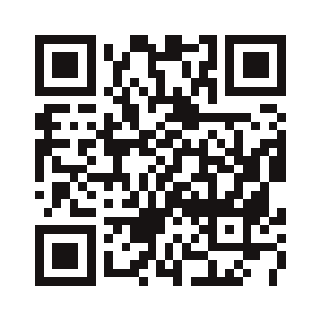
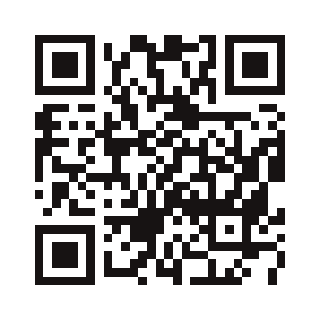
Generate a QR code that opens the Kitly contact page, and confirm that the downloaded files contain that address before anything is printed.
This page is static HTML. The QR Code Generator needs JavaScript because it draws the code in the browser. You can still read the settings, address, and limits with JavaScript off. The generator does not upload the content.
Inputs
The content is https://kitlyapp.com/en/contact/, 32 characters, including the final slash. The files below were generated with qrcode 1.5.4, the same library and options the tool uses: correction Q, margin 4, 320 px, foreground #171313ff, and background #ffffffff.
Decisions
Encode the final page, not a short link
The handout should keep opening the contact page without a server record. A static QR code does not change after it is printed. This guide does not create a short link.
Change only the error correction
The generator starts at https://kitlyapp.com/, 320 px, margin 4, Medium correction, and the colors #171313 and #ffffff. For this handout, replace the address and change correction to Quartile. Leave size, margin, and colors alone.
Create a short link only on a separate visit, by hand
If the code later needs to contain a kitlyapp.com/s/ address, create it on the URL Shortener, copy the resulting HTTPS address, and paste it into the QR field. The two tools do not pass the address. The shortener page cannot edit or expire the link.
Verified sequence
Do not print the field's starting value. If it is still https://kitlyapp.com/, the code opens the homepage, not the contact page.
- Open the QR Code Generator. Replace the text with https://kitlyapp.com/en/contact/. The summary should show 32 characters.
- Leave size at 320 px and margin at 4 quiet zone. Change error correction from Medium to Quartile. Leave the foreground at #171313 and the background at #ffffff.
- Download the PNG and SVG. The tool names them kitly-qr-code.png and kitly-qr-code.svg. The copies on this page use descriptive names and were generated with the same options.
- Before printing, decode both files. In this check, Chrome's BarcodeDetector read the contact address from the PNG and from the SVG rasterized at 320×320.
- Print a proof and scan it with a phone. This guide's decode was on screen, not on paper.
- Do not create a short link to repeat this example. The URL Shortener stays outside the measured result.
Observed result
Generated with qrcode 1.5.4 through the same calls the tool makes, toDataURL for the PNG and toString for the SVG. Decoded in Headless Chrome 154.0.8037.99 with BarcodeDetector. No short link was written.
Decoded content
https://kitlyapp.com/en/contact/| Address | https://kitlyapp.com/en/contact/ — 32 characters, including the final slash. |
|---|---|
| Settings | 320 px, margin 4, correction Q (Quartile), foreground #171313, background #ffffff. The library receives #171313ff and #ffffffff. |
| PNG | 320×320, 2267 bytes, shown as 2.2 KB, image/png. BarcodeDetector read the contact address. |
| SVG | 320×320, 1643 bytes, shown as 1.6 KB. Rasterized at 320×320, BarcodeDetector read the same address. |
| Light contrast, not published | A separate PNG with foreground #f2f3f4 on #ffffff also decoded in the same detector. It is not on this page, because a screen success does not recommend that color for print. |
Limitations
- A screen decode does not prove a printed page will scan. Print a proof.
- The #f2f3f4 foreground test still decoded on screen. Use the dark #171313 foreground from this guide.
- The content is static. If the address changes, print again. The QR code does not look up an editable destination.
- The shortener accepts optional slugs of 3–64 lowercase letters, numbers, and hyphens, rejects local or private destinations, and applies 10 requests per minute and 60 per hour. The interface has no edit, expiry, or delete control.
- This guide created no production link. An empty field clears the QR code. This 32-character address generated without an error.
Tools in this language
Open each tool in this same language. The address does not pass from one tool to the other.
- QR Code Generator Draws the local PNG and SVG for the contact address with the print settings above.
- URL Shortener Outside this result. Use it only if the printed code must contain an /s/ address, and paste that address into the generator yourself.